

Triagen
AI-assisted haematology triage for faster, safer clinical decision-making
View Live PrototypeRole : UX Designer & Researcher
Timeline : 12 weeks
Platform : Desktop website
Scope : Research Concept > Prototype > Expert Testing > UI
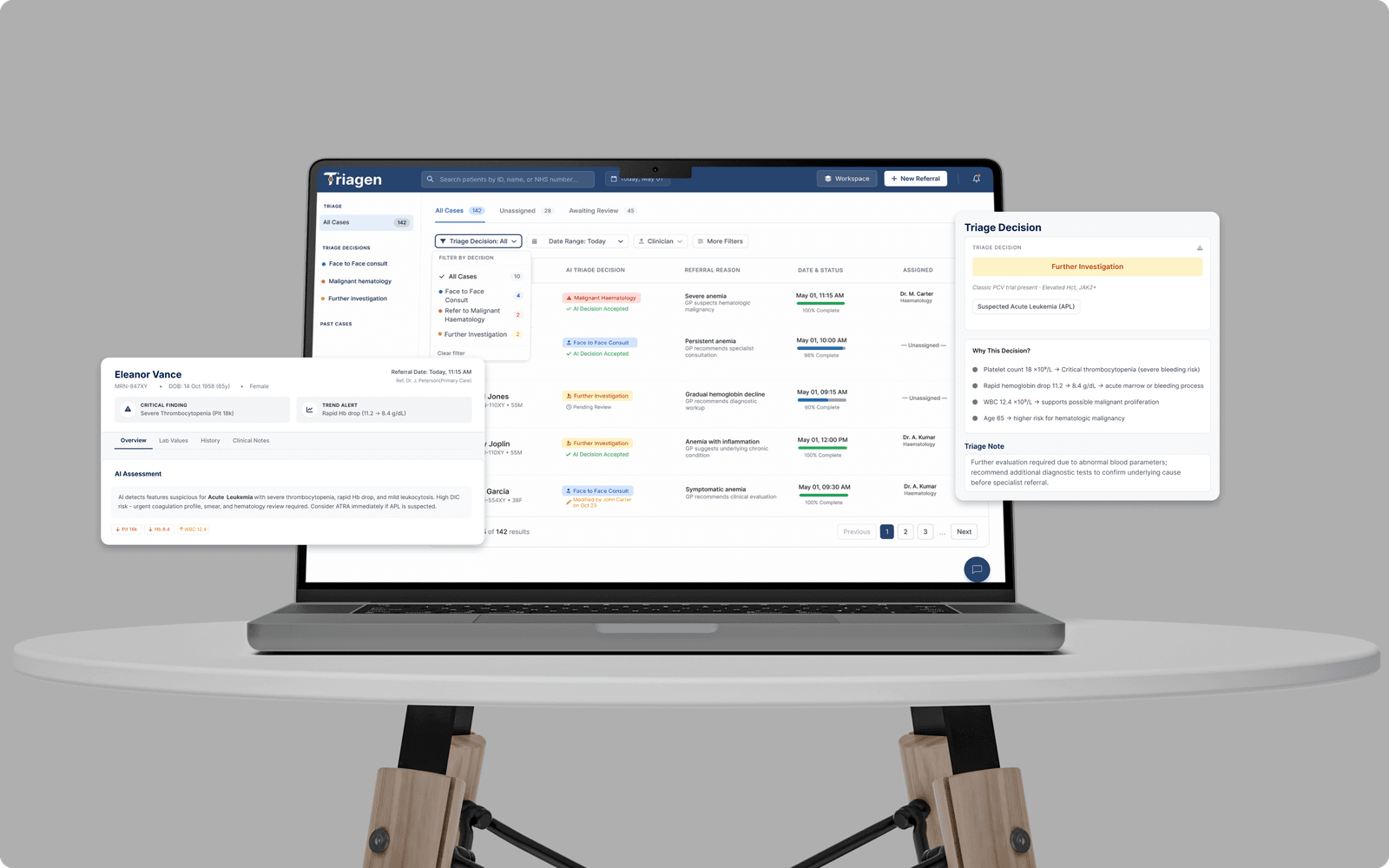
The Triage Workflow That Made Clinical Decisions Harder
Haematology triage is the process of reviewing incoming referrals and deciding how urgently each patient needs specialist care. In the current workflow, nurses and clinicians manually review referral letters, lab values, scanned reports, and clinical notes before assigning a triage pathway.
The problem was not a lack of clinical data.
The problem was that the data was scattered, unstructured, and cognitively heavy to process under time pressure.
Nurses had to read long referral letters, cross-check abnormal lab results, judge urgency, and document decisions without a consistent interface designed for haematology triage. This created risk around missed patterns, inconsistent decisions, and delayed prioritisation.
Triagen was designed as an AI-assisted clinical decision-support interface that helps clinicians quickly prioritise referrals, understand AI reasoning, and retain full control over the final decision.
The system does not automate triage.
It structures clinical information, suggests a triage pathway, explains the reasoning, and lets the clinician accept or modify the decision with documentation.
Design Challenge
How might we design an AI-assisted haematology triage interface that helps clinicians quickly prioritise referrals, understand AI reasoning, and maintain full control over clinical decisions?
This was a high-stakes workflow design for clinical decision-making. When haematology referrals are difficult to scan, clinicians lose time, cognitive load increases, and urgent cases can be harder to identify. For conditions such as suspected leukaemia or malignant haematology cases, triage delays can directly affect patient care.
High Cognitive Load
Clinicians had to manually scan referral text, lab results, and reports while managing multiple complex cases.
Inconsistent Decisions
Triage decisions could vary across clinicians, shifts, and institutions because there was no standardised support layer.
Low Trust in AI
AI suggestions alone were not enough. Clinicians needed transparent reasoning, source evidence, and control before trusting any recommendation.
A Structured Process To Understand Clinical Workflow Before Designing AI Support
The project followed a structured design process centered on clinical workflow, cognitive load, and clinician trust. It did not aim to prove that AI could replace triage decisions. Instead, the focus was on identifying where AI could provide meaningful support. The solution was designed to strengthen, not disrupt, clinicians’ existing decision-making process.
Discovery
01
Literature Review
Reviewed AI triage, clinical workflows, and decision-support research.
Research
02
Clinician Survey
Identified triage pain points, trust gaps, and AI workflow needs.
Ideation
03
Concept Ideation
Explored dashboard and AI decision-support concepts.
Prototype
04
Co-Creation
Mapped dashboard, case review, and clinical decision flows.
Validation
05
Expert Testing
Tested workflow clarity with three practising doctors.
Output
06
Final Interface
Refined AI reasoning, actions, documents, and Ask AI support.
I reviewed existing research to understand how AI is currently used in clinical triage and where gaps remain in haematology referral workflows.
Research Goals :
I focused on four questions:
How are referrals currently reviewed and prioritised?
What causes delays and inconsistent triage decisions?
How can AI process unstructured clinical information?
How can AI support clinicians without replacing their judgement?
What I Explored :
I reviewed few peer-reviewed research and haematology triage studies focusing on :
The biggest problems clustered around four areas.
01
Unstructured referral review
Clinicians had to scan long referrals manually, increasing cognitive load and slowing urgent signal detection.
High Severity02
Weak Prioritisation Support
Referrals lacked clear urgency, pathway, and document-completeness cues, forcing clinicians to prioritise manually.
High Severity03
Need for AI Reasoning
Clinicians needed AI support that explained urgency, highlighted key clinical factors, and showed confidence behind each recommendation.
High Severity04
clear Decision Actions
Clinicians needed accountable actions: accept the AI recommendation or modify it with a documented clinical reason.
medium SeverityClinicians Did Not Need More Information. They Needed Clearer Decision Support.
The research showed that haematology triage was not failing because clinicians lacked data. It was failing because the available information was difficult to interpret quickly. Referral details were often long, inconsistent, and unstructured. Lab values and scanned reports were available, but clinicians still had to manually connect fragmented evidence to the final triage decision.
I adapted my survey questions into a structured interview checklist and used it during sessions with a clinical mentor. This approach helped me gather qualitative, expert-informed insights without accessing confidential patient information or involving practising nurses directly. Although this phase did not include interviews with real triage nurses, the clinical mentor helped evaluate realistic workflow scenarios, likely decision-making behaviours, and potential points of cognitive and emotional strain. These findings were treated as directional rather than representative and would require validation with practising clinicians before implementation.
The strongest finding was simple:
AI support would only be useful if clinicians could understand and verify how it reached its recommendation.
Manual triage created inconsistency
No consistent process followed by all clinicians, shifts, or hospitals.
Referral data was hard to use
Important clinical signals were buried inside unstructured referral letters and reports.
Interfaces increased cognitive load
Clinicians had to scan too much information under time pressure.
AI reasoning needed to be visible
Clinicians needed traceable reasoning and source evidence, not just confidence scores.
Decision actions lacked clarity
Clinicians needed explicit Accept or Modify actions with documentation and audit trail.
Critical Finding
Clinicians did not want AI to make the decision for them.
They wanted AI to reduce the burden of finding, structuring, and explaining clinical evidence so they could make the final decision with more confidence.
Reviewing Referral Information
Clinicians had to read through long referral notes to find the important details. This made it harder to spot urgent clinical signs quickly.
Connecting Evidence To Urgency
Key details like lab results, history, mutations, and risk factors felt disconnected. Clinicians needed a clearer explanation of why a case was marked urgent.
Making The Final Decision
The prototype needed to clearly show that triage nurses make the final decision. AI could support the review, but nurses needed clear actions to confirm or modify the decision with a reason.
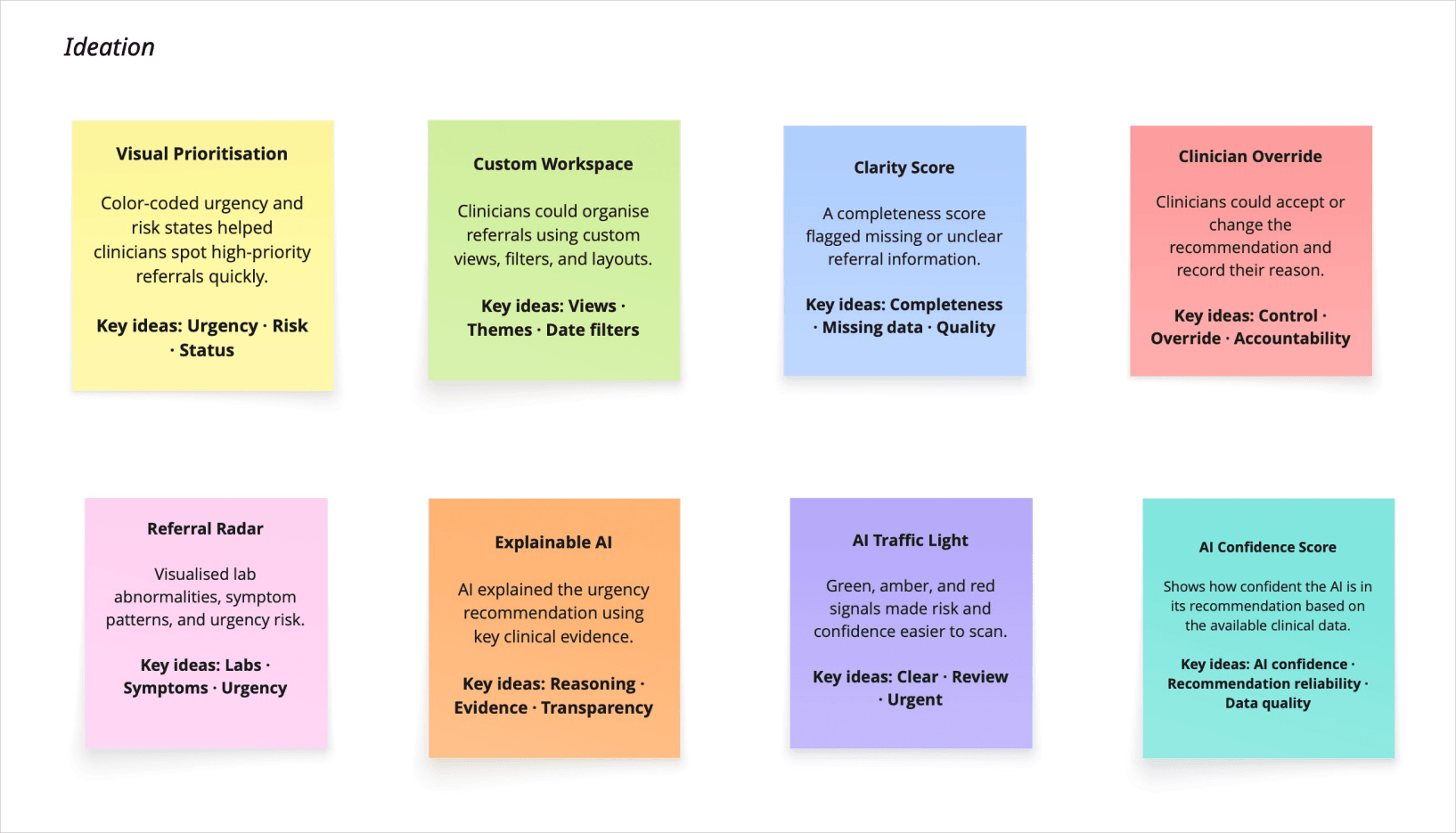
Explored AI-assisted triage concepts to simplify referrals, reduce cognitive load, and keep clinicians in control.
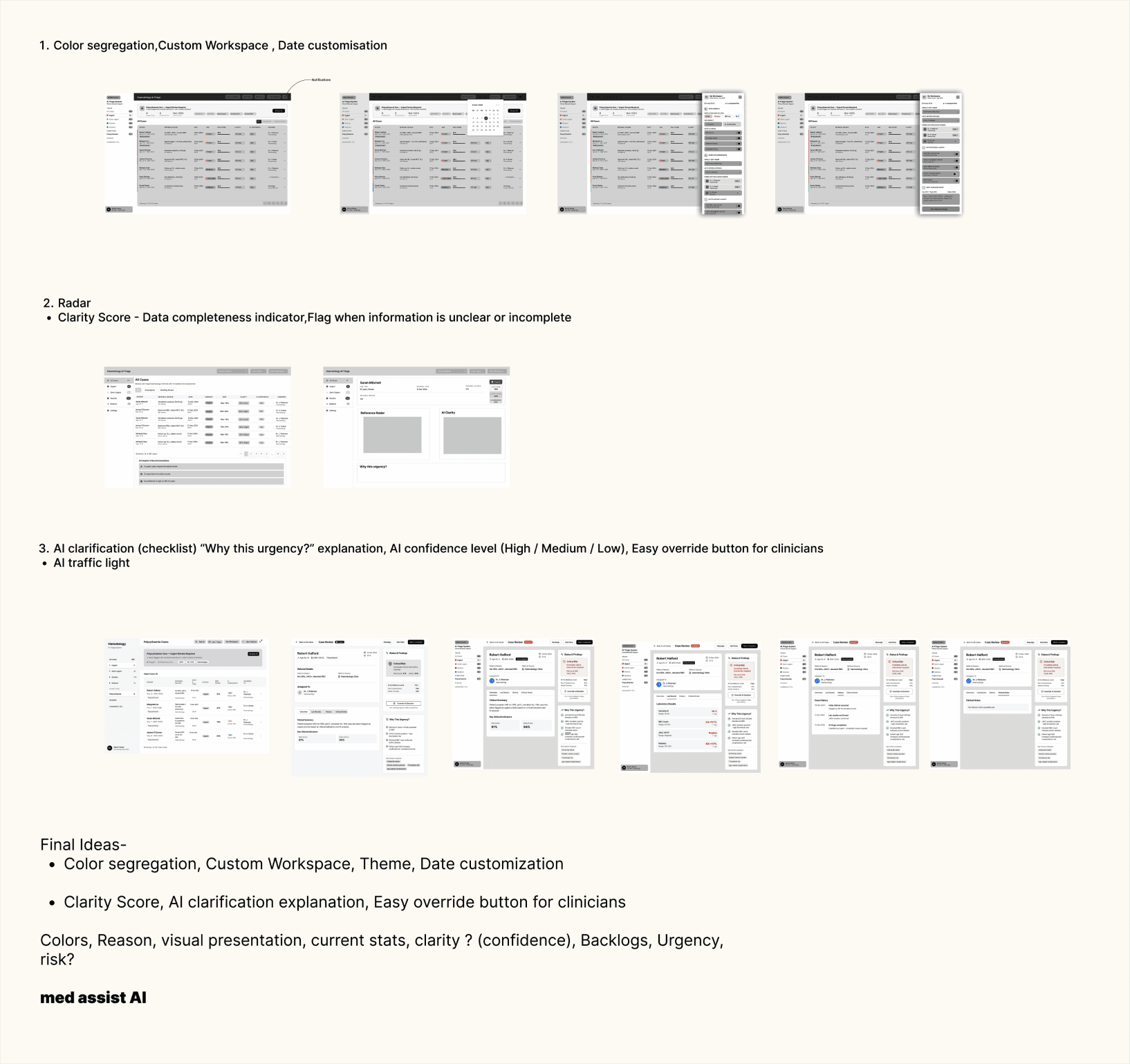
Fixing The Workflow Before Refining The UI
The early wireframes focused on workflow structure, information hierarchy, and decision logic. The goal was to validate whether clinicians could move through the triage process without unnecessary context switching.
Clinical Feedback Made The Design Sharper
Think-aloud testing with three practising doctors helped evaluate whether the interface matched real clinical reasoning. The testing was especially useful because doctors could identify where the prototype looked clear from a UX perspective but still failed clinical expectations.
What experts told us :
AI Transparency Was Not Optional
Doctors wanted clinical factors, sources, and reasoning behind each recommendation.
Workflow Fit Needed Improvement
The interface had to support scan PDFs, appointment type, and triage notes.
Decision Actions Were Unclear
Clinicians wanted clear authority to accept or modify the AI recommendation.
Quick Reasoning Support Was Useful
Experts wanted an Ask AI feature for fast case-specific questions.
Testing Signals That Changed The Design
Before: AI reasoning was presented as a short explanation.
After: Added “Why This Urgency?” with clinical factors and confidence.
Before: Decision actions felt overlapping and unclear.
After: Used two actions: Accept AI Decision or Modify AI Decision.
Before: Lab values were not visually distinct enough.
After: High and low lab values were marked with directional indicators to improve scanability.
Before: Reports and scans were not easy to access.
After: Scans and PDF reports were added into the case review workflow.
Explainable AI. Clinician-Led Decisions.
Based on the research and testing, the design strategy focused on reducing cognitive load while preserving clinician authority. The interface needed to help clinicians understand urgency quickly without making the system feel like a black-box decision-maker.
Prioritisation Clarity
The dashboard needed to organise incoming referrals around clinical urgency, triage pathway, and document completeness.
Explainable AI Reasoning
Every AI suggestion needed visible evidence, confidence level, and clinical reasoning.
Clinician Control
Clinicians needed clear accept or modify actions, with required documentation when changing the AI suggestion.
Document Completeness
The interface needed to show whether supporting documents were available before decisions were finalised.
Workflow Continuity
The experience had to keep overview, evidence review, AI reasoning, and final decision-making connected in one workflow.
Making AI-Assisted Triage Easier To Review, Trust, And Control.
The final desktop interface focused on helping triage nurses review referrals faster, understand AI recommendations, and make accountable clinical decisions. The design was not created to let AI decide independently. It was designed to make urgency, evidence, documentation, and final nurse-led decisions easier to manage in one connected workflow.
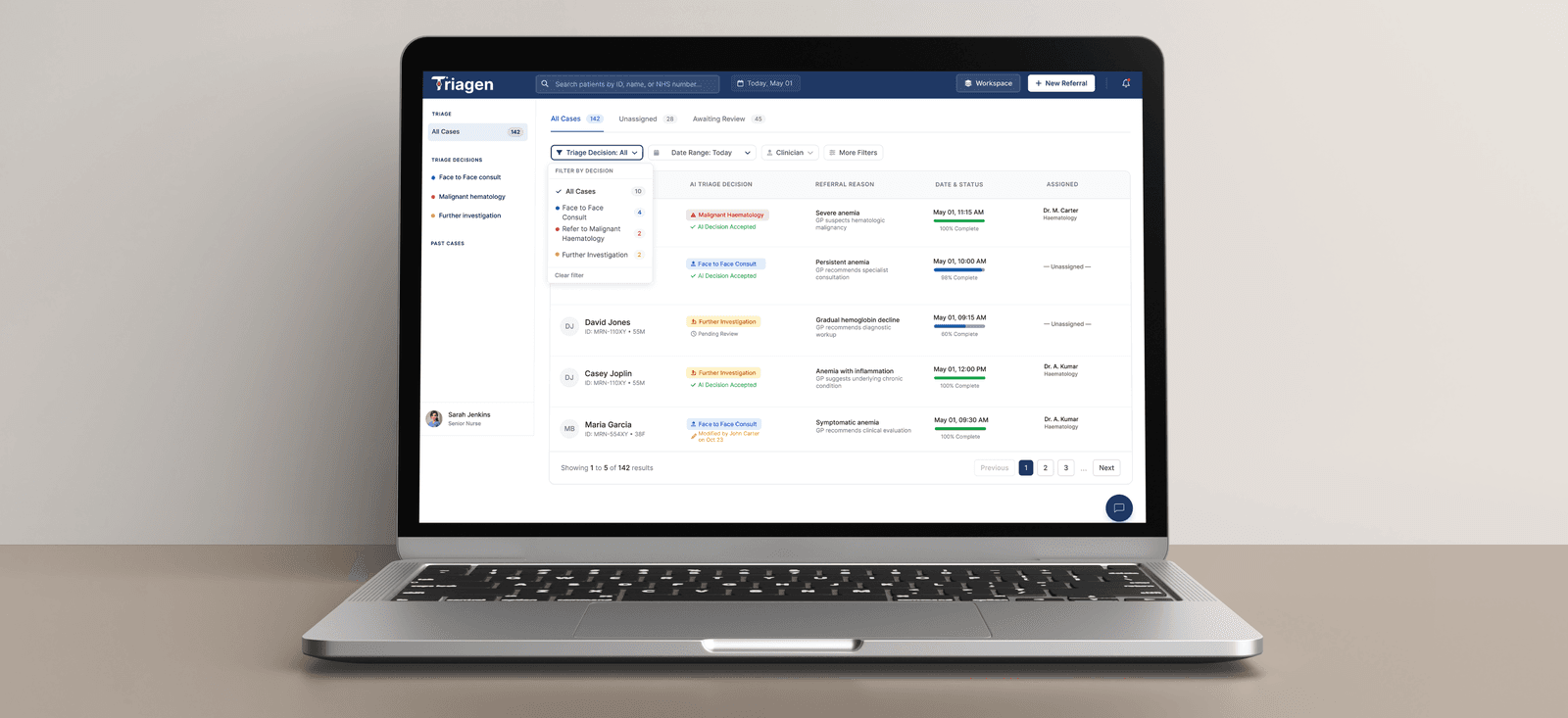
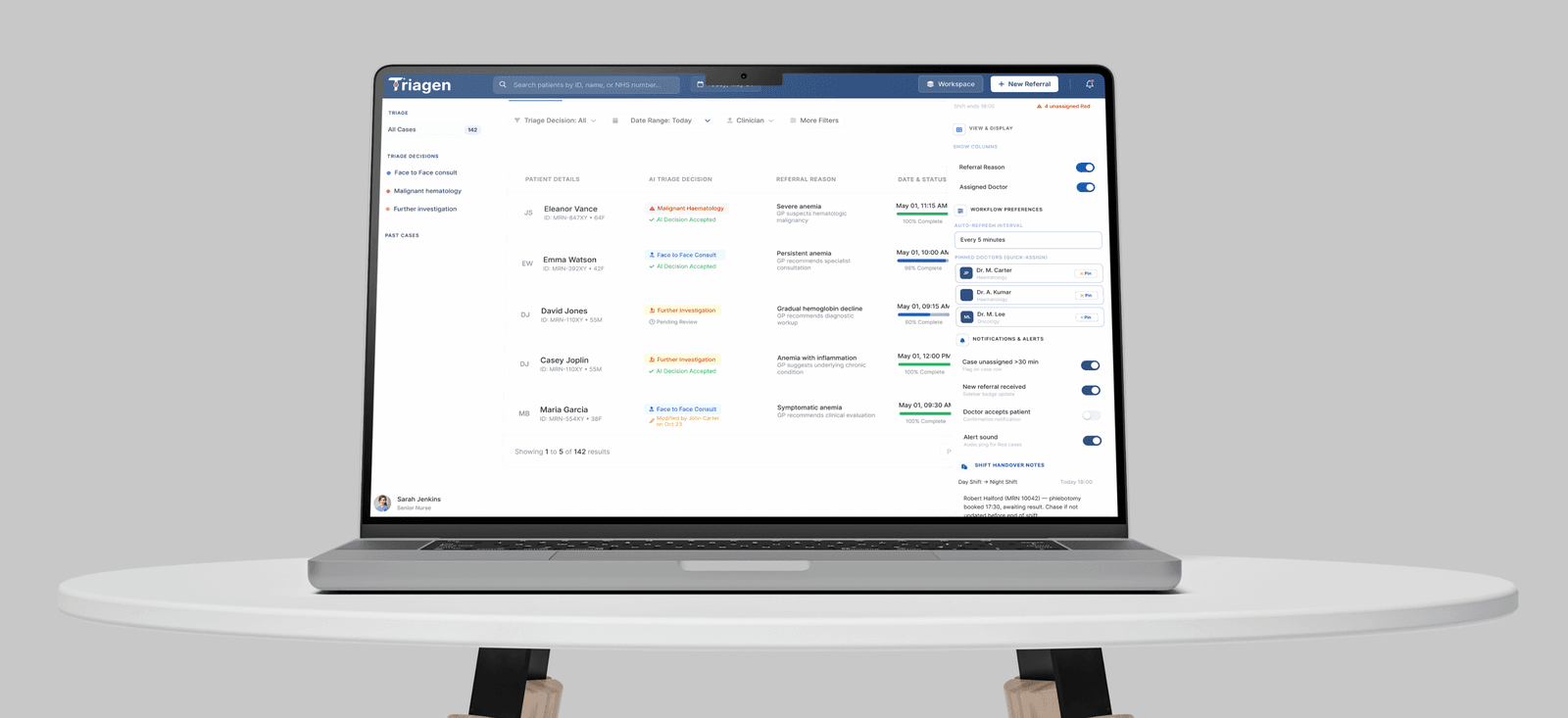
Case Dashboard: Clearer Referral Prioritisation
The dashboard gives triage nurses a structured view of all incoming cases. Cases are organised by triage decision, status, referral reason, assigned clinician, and completion level. This helps nurses identify urgent referrals faster instead of manually scanning disconnected case information.
Workspace Controls: Better Shift And Case Management
The workspace panel supports real clinical triage work beyond the case list. Nurses can control visible columns, manage alerts, pin doctors, set refresh preferences, and write shift handover notes. This makes the dashboard more useful during active clinical shifts.
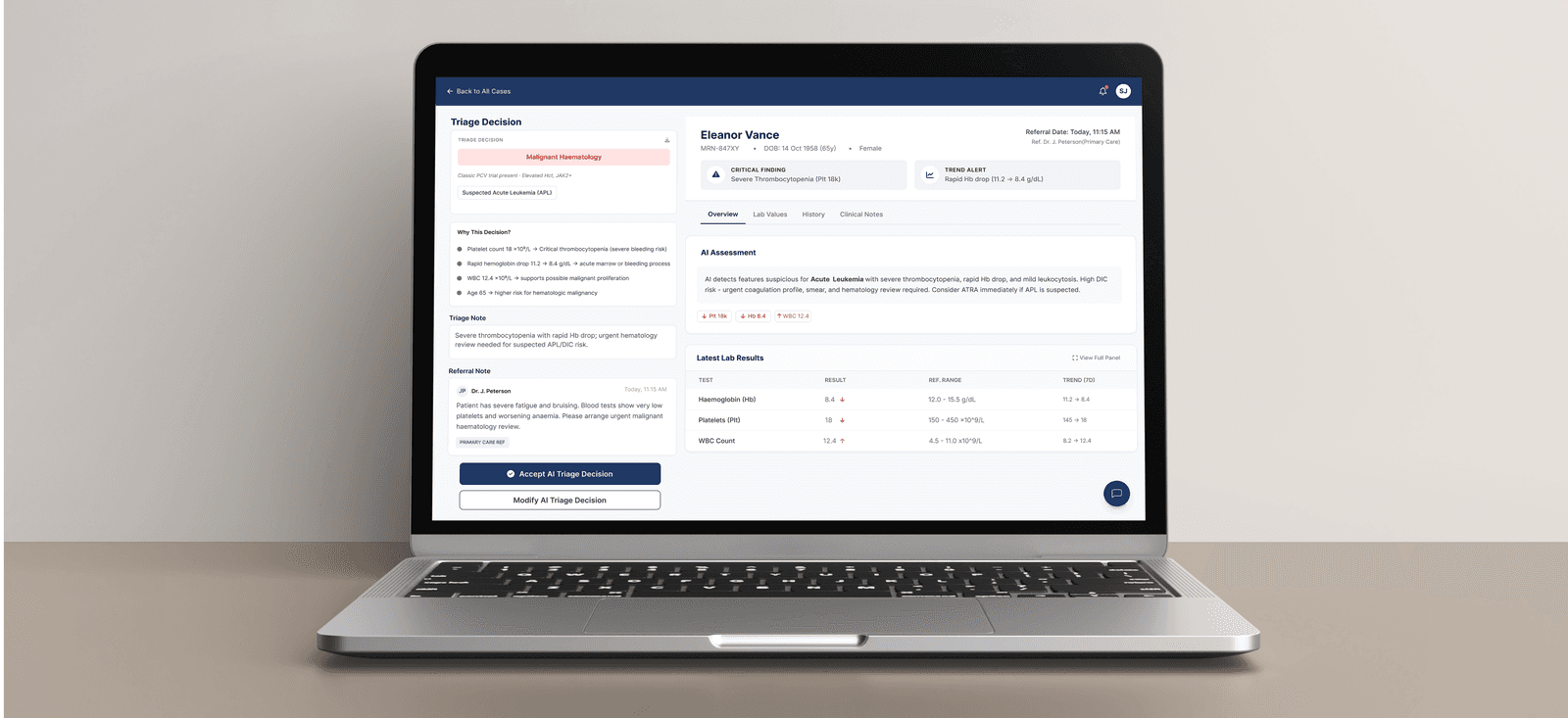
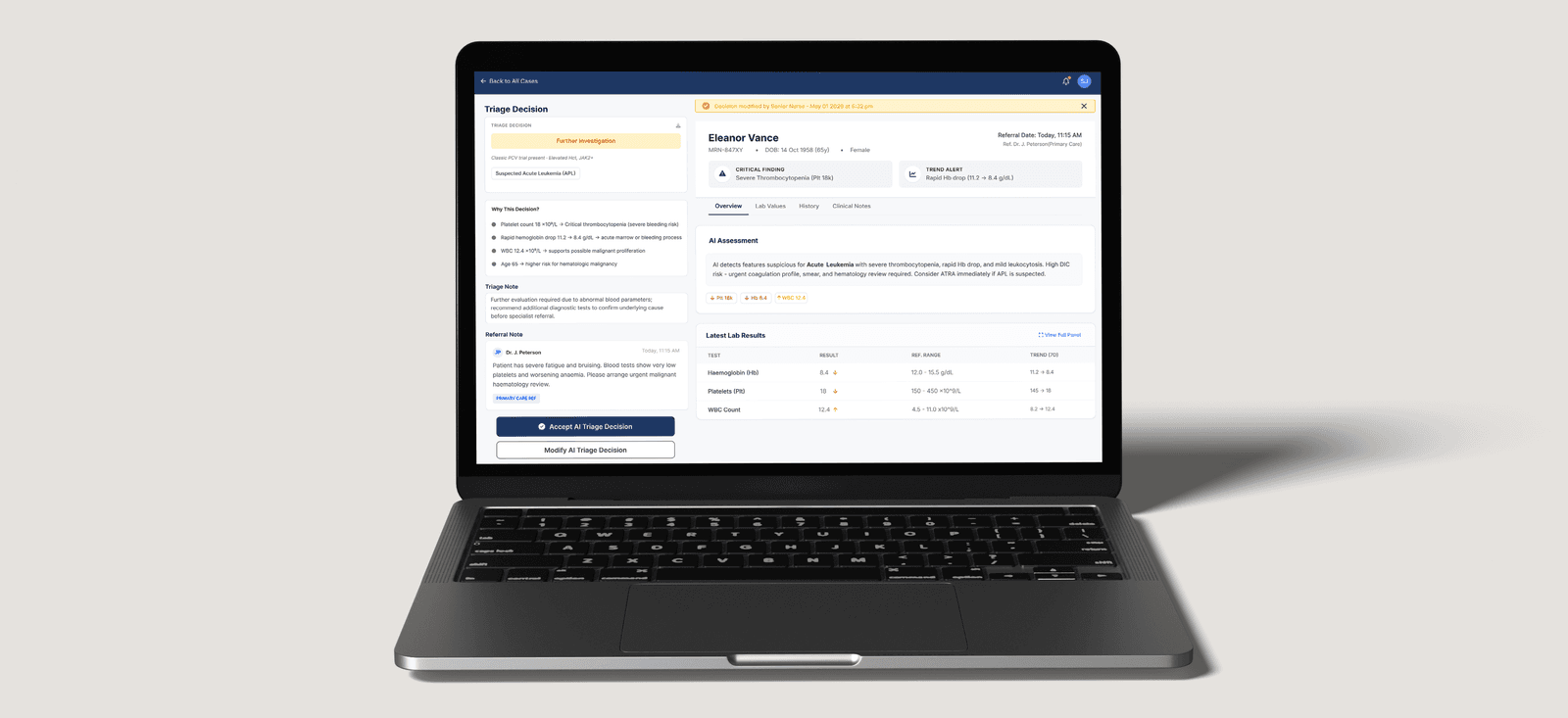
Case Review: Evidence And AI Reasoning In One View
The case review screen connects patient details, referral notes, lab values, AI assessment, and triage reasoning in one place. The “Why This Decision?” section explains the clinical factors behind the recommendation instead of only showing a confidence score.
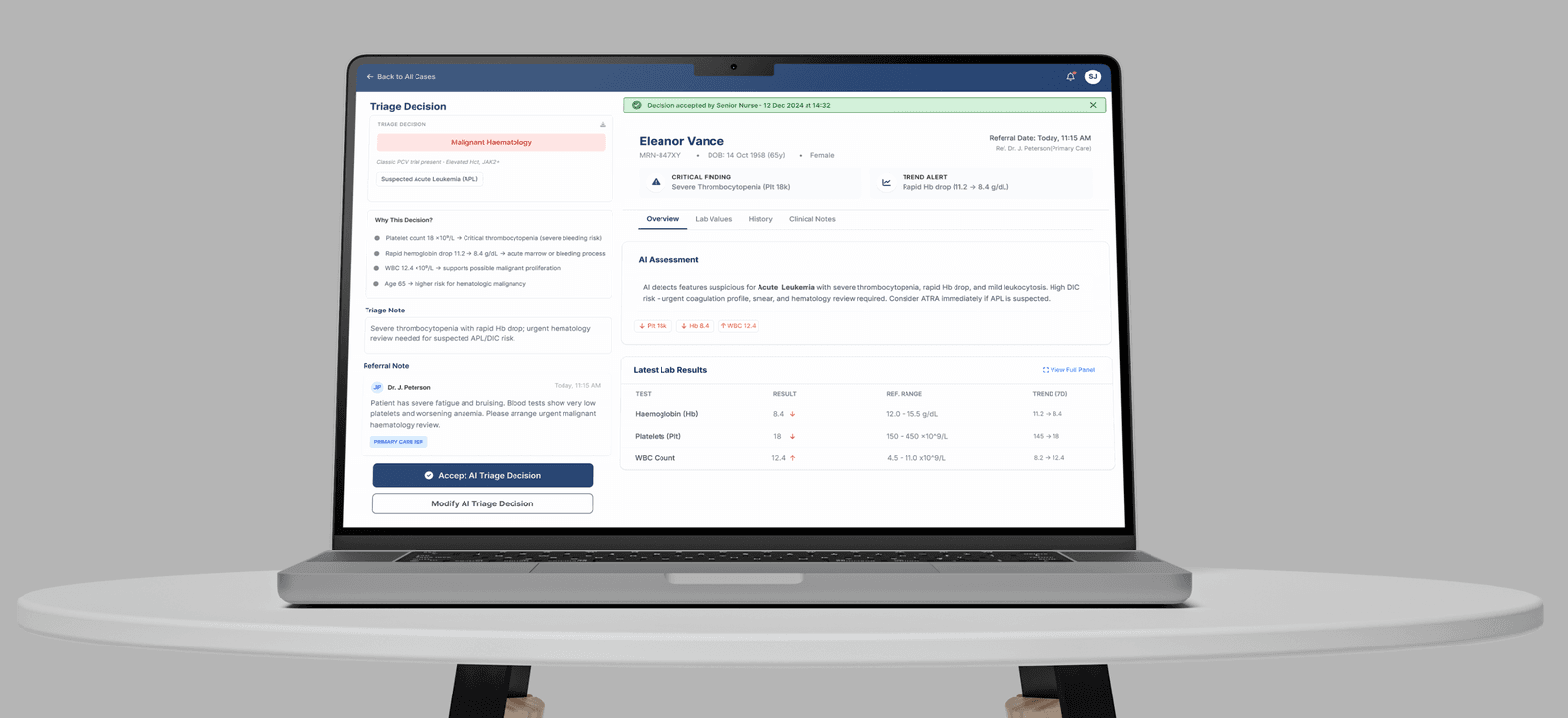
Accepted Decision State: Clear Nurse Accountability
After the nurse accepts the AI triage decision, the interface shows the decision status and who accepted it. This makes the final clinical action visible, documented, and accountable.
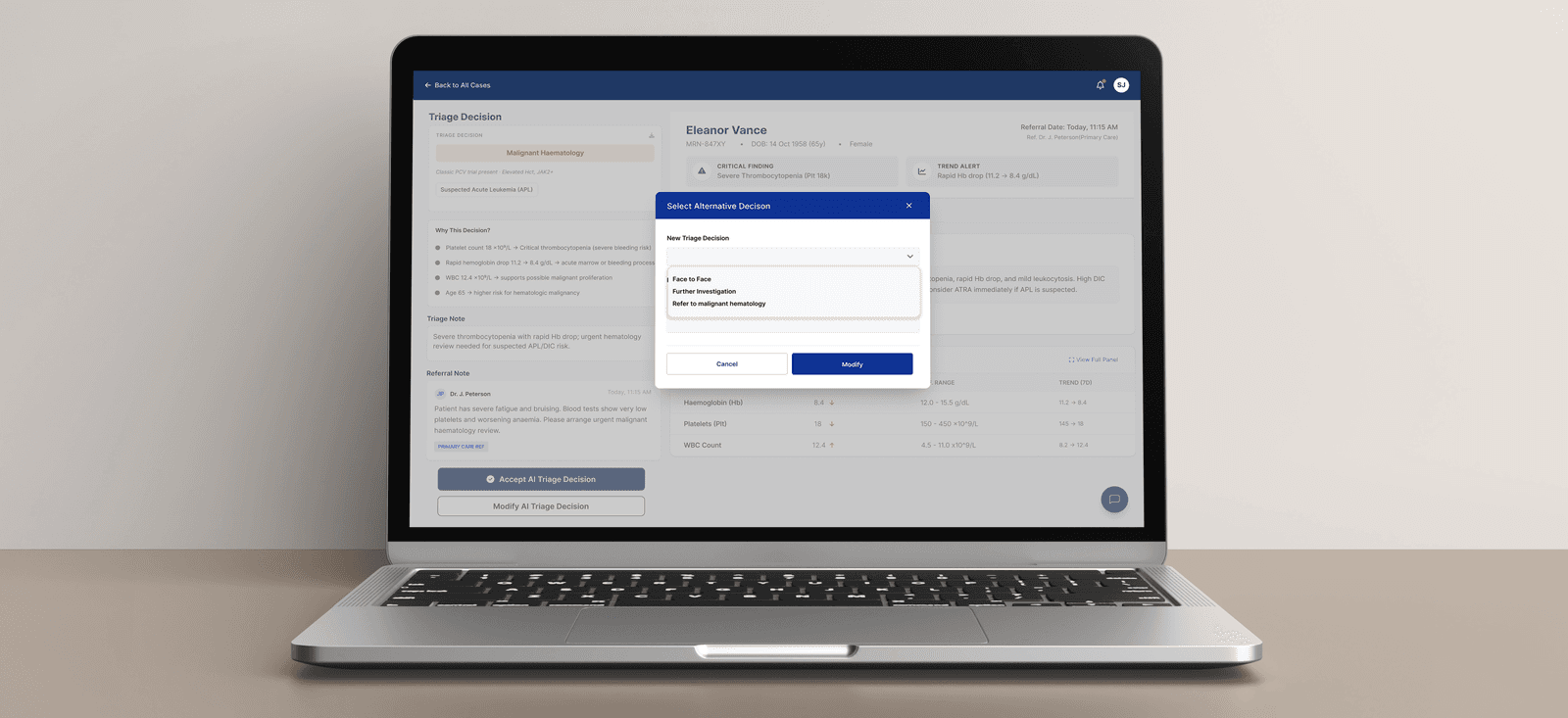
Modify Decision Flow: Controlled Override With Reason
When the nurse disagrees with the AI recommendation, the modify flow requires an alternative triage decision and a reason. This keeps clinician authority clear while making changes traceable.
Modified Decision State: Updated Triage Outcome
After modification, the case updates to show the final nurse-selected decision and documentation. The interface keeps the original AI reasoning visible while clearly showing the nurse's final decision.
PRIORITISATION
Referrals were organised by urgency, decision type, assignment, and status so nurses could identify high-risk cases faster.
AI EXPLAINABILITY
AI recommendations showed clinical factors, lab trends, and reasoning instead of only giving a summary.
CLINICIAN CONTROL
Nurses had clear actions to accept or modify the AI recommendation, keeping the final decision clinician-led.
DECISION TRACEABILITY
Any modified decision required a reason, making changes visible, trackable, and clinically accountable.
This project taught me that AI in healthcare should not be designed to replace clinical judgment. It should reduce the effort required to review complex information while keeping the clinician fully in control of the final decision.The most important design challenge was creating trust through visibility. A confidence score alone was not enough. Clinicians needed to see the evidence, understand the reasoning, review the source information, and know exactly how to act on the recommendation. I also learned that safety-critical interfaces need restraint. More features do not automatically make the product better. The value came from simplifying the workflow, making urgent information easier to scan, and turning AI output into something clinically reviewable, explainable, and accountable.
Next Project
Japanese Friendship Garden of PhoenixCoffee? Let's Build Something Thoughtful.
I’m open to conversations about product design, UX strategy, AI experiences, and teams building
work that genuinely helps people.
Radhika Sunil Autade
Phoenix, Arizona
© 2026 Radhika Sunil Autade. All rights reserved.